
If you’re reading this, you’ve likely hit the same wall I did for years. You craft a solid YouTube video. You have a valuable offer or message. You hit publish… and hear crickets. The culprit? A weak thumbnail. It’s the single greatest bottleneck for video success, and as someone who’s tested countless tools for content creation and traffic, I can tell you that most “solutions” add more complexity than they resolve. They promise AI magic but deliver generic outputs, steep learning curves, or recurring fees that eat into your ROI.
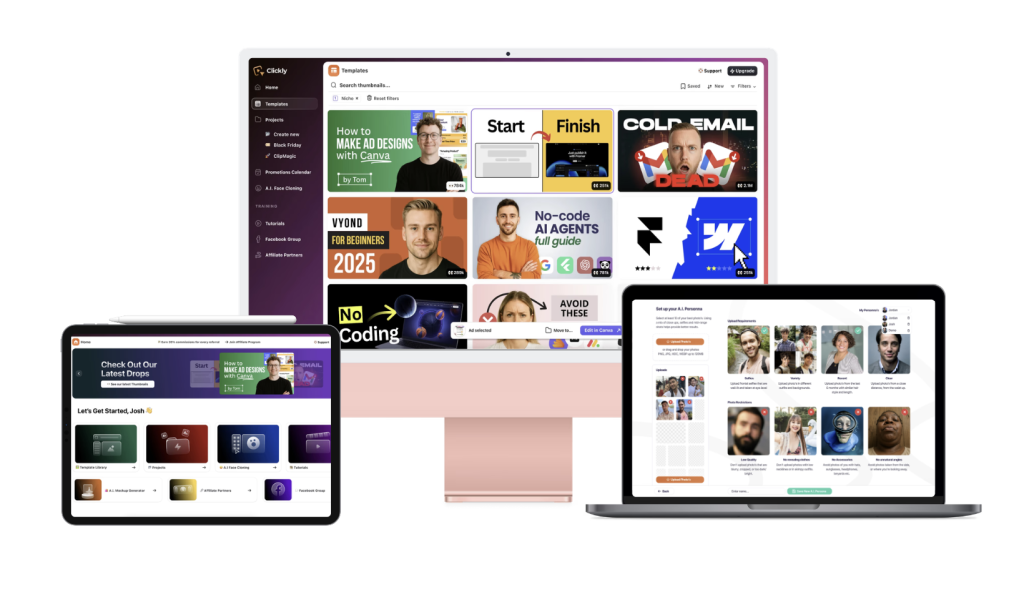
What made me pause and genuinely consider Clickly Lifetime was its foundational premise: Don’t guess what works; start with what’s already winning. It positioned itself not as another creative toy, but as a marketer’s utility. This review is my hands-on experience – no hype, just a breakdown of whether it solves the real problem and if the lifetime deal is the logical choice it appears to be.
Beyond Features: The Practical Benefits That Change Your Workflow
Forget the feature list. Let’s talk about what actually improves when you use Clickly for a real project.
1. The Confidence of Starting from Proof
Clickly’s library of 2,000+ templates isn’t just a collection of nice graphics. Each is modeled on a thumbnail from a video with a minimum of 100,000 views. This is the core value proposition. As a marketer, this shifts your mindset from “What should I create?” to “Which proven pattern fits my goal?” It eliminates the paralyzing blank canvas and injects data-driven confidence into the very first step. You’re reverse-engineering success, not hoping for it.
2. AI That Understands Context, Not Just Prompts
The “AI Magic Thumbnail Generator” is more sophisticated than it seems. You paste your YouTube video link. The AI analyzes your content – your title, your topic – and uses that context to guide creation. You then select a “winning preset” (like “Make Money / Curiosity” or “Fitness / Transformation”), which acts as a strategic filter. The result is an AI-generated thumbnail that’s actually relevant to your video’s hook, not a random, pretty picture. It’s AI working for your content strategy, not separately from it.

3. Authenticity Through AI Face Cloning
I was deeply skeptical of this feature. Most AI avatars look fake. Clickly’s face cloning, using one selfie, creates varied, realistic expressions of you. For personal branding, this is a quiet game-changer. It ensures every thumbnail has your recognizable, authentic face without needing a library of staged photos. For faceless channels, it provides a consistent, trustworthy “host” image. It solves a practical production problem elegantly.
4. The Non-Negotiable: Full Canva Editability
This is what separates Clickly from other generators. Every output exports to Canva as a fully layered project. You get the AI’s first draft or the proven template, but you keep 100% control. Change text, colors, positioning in minutes with simple drag-and-drop. This combination – AI-powered foundation + human fine-tuning – is where the tool’s real power lies.
If the idea of generating a professional, high-CTR thumbnail in under a minute seems too efficient to be true, I encourage you to see the logical workflow for yourself. You can examine the process and the current lifetime deal structure here.
The Real-World Test: From Skepticism to Routine Use
I onboarded in minutes. The interface is straightforward. I used it for two immediate needs:
- For an Affiliate Review Video: Pasted my URL, chose a “Tech/Shock” preset, uploaded my photo. In under a minute, I had three options featuring my face with a convincingly surprised expression, clean text, and relevant icons. I chose one, edited the text color in Canva in two minutes, and uploaded. Process time: 4 minutes.
- For a Client’s Coaching Channel: Went straight to the template library, filtered for “Business,” and selected a popular “Side-by-Side Comparison” layout. Dropped in the client’s cloned face (created earlier), updated the text, and exported. Client approval came in record time. Total time: 8 minutes.

The Learning Curve: It’s minimal. If you can use Canva, you can use Clickly. The platform logically guides you through its two paths: AI Generation or Template Selection.
The Mental Shift: Using Clickly stopped feeling like “graphic design” and started feeling like assembling a high-performance marketing component. It removed subjective guesswork and replaced it with a systematic, repeatable process.
The Trust Builder: The realistic face cloning and the transparent premise (“proven templates”) built trust faster than any flashy AI demo could. It felt pragmatic.
For consultants, freelancers, and agency owners, the value calculation shifts dramatically here. The included Commercial License transforms Clickly from a personal tool into a service delivery engine. You can create client assets at a massive margin. The current launch offer, which includes this license, is detailed at the same link.
Balanced Pros & Cons: The Full Picture
Pros:
- Eliminates Creative Guesswork: The “proven template” foundation is a massive strategic shortcut.
- Dramatic Time Savings: Transforms a multi-hour task into a 5-10 minute process.
- Authentic & Realistic Face Cloning: Uniquely solves brand consistency for personal and faceless channels.
- Perfect AI/Human Hybrid Model: Full Canva editability ensures you’re never stuck with an AI’s first idea.
- Clear, Fast ROI: Pays for itself with one client project or a month of personal use.
- Lifetime Access (Current Deal): A one-time fee in a world of endless SaaS subscriptions is a compelling financial logic.
Cons:
- Not for Artistic Purists: If you seek wholly original, avant-garde art for every thumbnail, this is a system, not a muse.
- AI Credits are a Consumable: The 200 included credits are generous, but high-volume users will need to purchase more (a separate one-time fee). The core template library is unlimited.
- Requires Basic Canva Familiarity: Maximum utility requires knowing your way around Canva’s basics – a low but necessary barrier.
Pricing & Value Analysis: The Logical Decision Framework
At a standard annual price, it’s a solid tool for active creators. The current lifetime deal at a one-time fee makes the decision almost purely logical.
Let’s frame the value in terms you likely use:
- Time ROI: If it saves you 90+ minutes per thumbnail, and you create 2 thumbnails a week, you’re buying back over 150 hours of your year. That’s time for more content, client work, or strategy.
- Cost Replacement: A single freelance thumbnail costs as much as the entire lifetime license. It pays for itself immediately upon first use for client work.
- Risk Reversal: The 30-day money-back guarantee allows for a genuine, no-pressure test in your real workflow.
- Skill Enhancement vs. Replacement: It doesn’t replace your marketing skill; it weaponizes it by removing the technical design barrier.

Perfect For:
- Affiliate marketers driving traffic from YouTube.
- Freelancers and agencies offering social media or video services.
- Coaches, consultants, and experts building a personal brand on video.
- “Faceless” or automation-based channel operators.
- Any business owner for whom YouTube is a lead source, not a hobby.
Not For:
- Casual YouTubers with no traffic or business goals.
- Professional graphic designers who don’t need templates.
- Those needing hyper-specific, narrative-driven custom illustration.
Final Verdict: A Pragmatic, High-Value Addition to the Stack
After years of sifting through overhyped tools, Clickly Lifetime stands out for its focused utility. It solves one specific, high-impact problem – low thumbnail click-through rate – with a method that makes sense for a marketer: leverage what’s proven, automate the heavy lifting, and keep final control.
It’s not a magic wand for YouTube fame. It’s a precision tool that ensures the content you work hard on gets the initial click it deserves. For the price of the lifetime deal, it represents one of the clearest cases of value-for-money I’ve seen in the content tool space. The logic is simple: if YouTube is part of your business, this tool removes a major friction point permanently.
You might also like our roundup of the Best AI SEO/Marketing Now!